

 DE
DE- Industries
- Finance
Nearshore software development for finance—secure, scalable, and compliant solutions for banking, payments, and APIs.
- Retail
Retail software development services—e-commerce, POS, logistics, and AI-driven personalization from nearshore engineering teams.
- Manufacturing
Nearshore manufacturing software development—ERP systems, IoT platforms, and automation tools to optimize industrial operations.
- Finance
- What we do
- Services
- Software modernization services
- Cloud solutions
- AI – Artificial intelligence
- Idea validation & Product development services
- Digital solutions
- Integration for digital ecosystems
- A11y – Accessibility
- QA – Test development
- Technologies
- Front-end
- Back-end
- DevOps & CI/CD
- Cloud
- Mobile
- Collaboration models
- Collaboration models
Explore collaboration models customized to your specific needs: Complete nearshoring teams, Local heroes from partners with the nearshoring team, or Mixed tech teams with partners.
- Way of work
Through close collaboration with your business, we create customized solutions aligned with your specific requirements, resulting in sustainable outcomes.
- Collaboration models
- Services
- About Us
- Who we are
We are a full-service nearshoring provider for digital software products, uniquely positioned as a high-quality partner with native-speaking local experts, perfectly aligned with your business needs.
- Meet our team
ProductDock’s experienced team proficient in modern technologies and tools, boasts 15 years of successful projects, collaborating with prominent companies.
- Why nearshoring
Elevate your business efficiently with our premium full-service software development services that blend nearshore and local expertise to support you throughout your digital product journey.
- Who we are
- Our work
- Career
- Life at ProductDock
We’re all about fostering teamwork, creativity, and empowerment within our team of over 120 incredibly talented experts in modern technologies.
- Open positions
Do you enjoy working on exciting projects and feel rewarded when those efforts are successful? If so, we’d like you to join our team.
- Hiring guide
How we choose our crew members? We think of you as a member of our crew. We are happy to share our process with you!
- Rookie boot camp internship
Start your IT journey with Rookie boot camp, our paid internship program where students and graduates build skills, gain confidence, and get real-world experience.
- Life at ProductDock
- Newsroom
- News
Stay engaged with our most recent updates and releases, ensuring you are always up-to-date with the latest developments in the dynamic world of ProductDock.
- Events
Expand your expertise through networking with like-minded individuals and engaging in knowledge-sharing sessions at our upcoming events.
- News
- Blog
- Get in touch

24. Feb 2026 •8 minutes read
How to do accessibility in 4 steps?
Jovana Mitrović
Software Engineer
Jovana Romčević
Designer
Lessons learned from a real project on implementing accessibility standards
Why accessibility matters
Our colleague Marta Costa, in her article “5 Key Facts You Need to Know About Digital Accessibility”, has already provided a clear and compelling overview of why digital accessibility is such a crucial topic today. Beyond the imperative of complying with legal and accessibility regulations, such as the European Accessibility Act, the real, and often underestimated, value of accessibility lies in its impact on a vast demographic of users with special needs. According to the World Health Organization, approximately 1.3 billion people, or 16% of the global population, live with a significant disability. Recognising this expansive group highlights not only the moral responsibility of creating inclusive digital experiences but also the strategic opportunity for IT companies: accessible products and services foster inclusion while extending reach to a broader and more diverse audience.
With this foundation in mind, it’s time to move from theory to practice. In the following sections, we will share insights from a real ongoing project, showing how accessibility was implemented in practice, the challenges we faced, and the valuable lessons we gained to guide future improvements.
Real case example
As an example, we present our collaboration with BMS Corporate Solutions, a German company developing advanced FinTech digital solutions for the banking sector. The project focuses on delivering seamless online services for bank consultants and end bank users, an area where accessibility is not only a best practice, but also a legal and social necessity. In Germany, financial institutions are required to comply with both the European Accessibility Act (coming into force in 2025) and national standards such as BITV 2.0 (Barrierefreie-Informationstechnik-Verordnung), which mandate barrier-free access to digital products and services. This case study demonstrates how accessibility extends beyond regulation to become a strategic foundation of inclusive, future-ready digital banking.
Goal
Our objective is to transform the existing online banking platform into a fully accessible solution that complies with the AA standard of the Web Content Accessibility Guidelines (WCAG 2.1), as referenced in the European Accessibility Act and relevant national regulations. This involves systematically resolving existing accessibility gaps while embedding robust accessibility practices into the development lifecycle.
To ensure transparency and accountability, progress will be measured through independent accessibility audits and conformance reports provided internally, providing clear evidence that the platform meets WCAG 2.1 AA requirements.
Accessibility in practice
As part of an intensive accessibility improvement phase, a dedicated team of an experienced designer, developer, and project manager systematically reviewed and remediated the solution against the WCAG 2.1 AA standard. Beyond fixing issues, the focus was on building lasting team capability to test, measure, and sustain accessibility across the product lifecycle.
Solution
1. Knowledge sharing and alignment on WCAG 2.1 AA standards
We began by strengthening our knowledge of the WCAG 2.1 AA accessibility standard, supported by internal documentation, audit templates, and best practices from other teams.
Through an accessibility onboarding webinar, the team was introduced to general accessibility concepts, and each member spent time understanding how the standard affects their role and how to embed accessibility best practices in their work. We also referred to the official Web Content Accessibility Guidelines (WCAG) 2.1 documentation, internal professional development resources, and knowledge shared between colleagues.
2. Identify and test accessibility gaps
By conducting simulated user testing, the first level of accessibility gaps was identified by designers and testers. This evaluation focused on visible and easily detectable issues, such as text readability, keyboard navigation, and interactive elements. The development team combined manual and automated testing tools (Lighthouse accessibility report and NVDA screen reader) to detect platform-wide accessibility issues, including missing ARIA labels, misused ARIA roles, incorrectly nested header elements, trapped focus during keyboard navigation, and lost focus on dialogs.
This comprehensive accessibility audit process established a shared responsibility framework, ensuring that managers, designers, and developers collaborate effectively to maintain and improve accessibility standards.
3. Implement accessibility improvements
Although accessibility is often viewed as the sole responsibility of designers and developers, our project approached the accessibility remediation process as a cross-functional accessibility effort embraced by the whole team.
Manager’s actions
- Setting priorities
In the Atruvia platform, about 50% of users’ interactions happen through forms. So the initial focus was on fixing the most noticeable accessibility issues, such as missing labels and unsupported error messages, followed by more complex problems, including the behavior of disabled form fields.
- Defining additional acceptance criteria
This involves specifying exactly how features such as labels, error messages, keyboard navigation, and screen reader support must function, enabling the design and development teams to implement accessibility requirements effectively.
Designer’s actions
- Defining clear and visible labels
The designer updated the form field components to include clear, visible, and understandable labels, addressing previous issues where some fields used Material UI’s hidden label feature. This improvement ensures the form is fully accessible to all users, including those relying on screen readers.
- Enhancing UX writing (microcopy) for error messages and interactions
Error messages and interactive feedback were improved to be concise, meaningful, and easily understandable, ensuring a better user experience for all users, not only those with disabilities.
- Visual components and contrast
- Visual design was optimized, ensuring a minimum text-to-background contrast ratio of 4.5:1
- Focus indicators were defined so that users navigating with a keyboard can always see where they are on the page
- The design systems responsive layout was enhanced consistent readability at up to 200% zoom.
Development team’s actions
- Implementing design changes
The development team implemented the design proposal by updating components to meet WCAG 2.1 AA contrast standards, including navigation, forms, and interactive elements.
- Applying technical best practices
The development team applied technical best practices and implemented additional solutions, such as ARIA attributes and screen reader–friendly elements. Through a detailed analysis of the existing codebase, all gaps in the current accessibility implementation were identified and resolved. Every relevant element on the page was ensured to be visible to screen readers, operable via keyboard navigation, and visually clear.
- Resolving unexpected issues: Material disabled field status
During implementation, it was identified that Material UI’s disabled input fields were not fully accessible to all screen readers. To address this, all form fields previously using the disabled status were replaced with readonly, ensuring that content remains perceivable, keyboard-navigable, and compliant with WCAG 2.1 AA standards.
4. Make accessibility an ongoing process
Embedding accessibility into agile workflows ensures long-term compliance and inclusion. To maintain compliance and continuously accessibility improvement, we adopted a company-wide practice integrating accessibility development for new features / products.
- Managers stay informed of the latest standards and define requirements accordingly.
- Designers incorporate recommendations and provide clear instructions for developers.
- Developers explore best practices and adopt new solutions.
- Testing follows a structured checklist to ensure all accessibility requirements are consistently met, including:
- Lighthouse accessibility report
- Keyboard navigation
- Dark/Light mode support
- Zoom up to 200%
- Screen reader compatibility
Real example
A brief overview of the process is presented through the accessibility issues we identified in the form component.
This was a critical area, as approximately 50% of the solution relies on forms, which are widely used in the financial industry. These issues served as a major warning signal and were treated as the highest priority for remediation.
Initial testing was focused on easy catched accessibility issues.
Before accessibility improvements
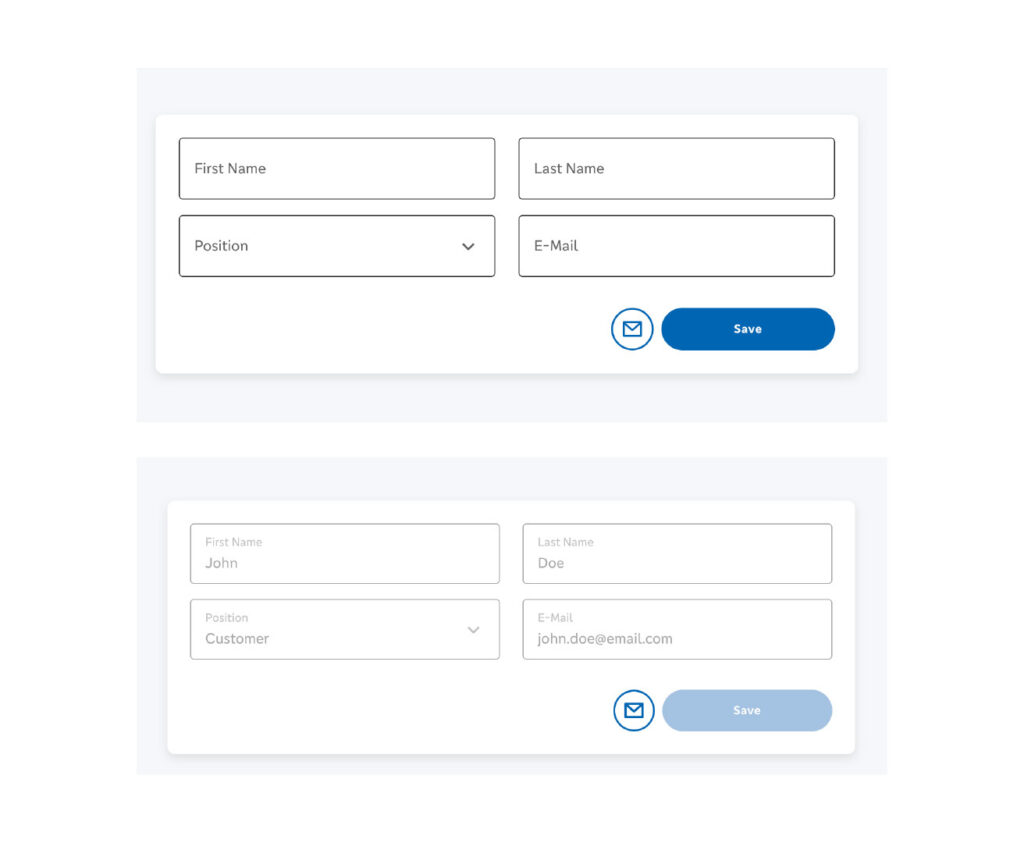
- Material input field with placeholder without label
Input fields were defined only through placeholder text, without persistent labels. Once users began typing, the guidance disappeared, leaving them unsure of what the field required. This created confusion not only for users with screen readers or cognitive impairments but also for the general user base, as the requirement status of fields was not clearly visible.
- Error indication based only on color
Errors were signaled solely through color differences, making them inaccessible to users with color vision deficiencies and failing WCAG requirements for non-color-dependent feedback.
Error messages lacked actionable instructions, leaving users uncertain about how to resolve the issue and continue successfully.
- Disabled state with low color contrast
Disabled form fields had insufficient contrast, making them difficult to perceive for users with low vision or in high-glare environments.
- Lighthouse Report
Lighthouse testing reported the current status of accessibility giving us clearer insight into what needs to be addressed at the development level.
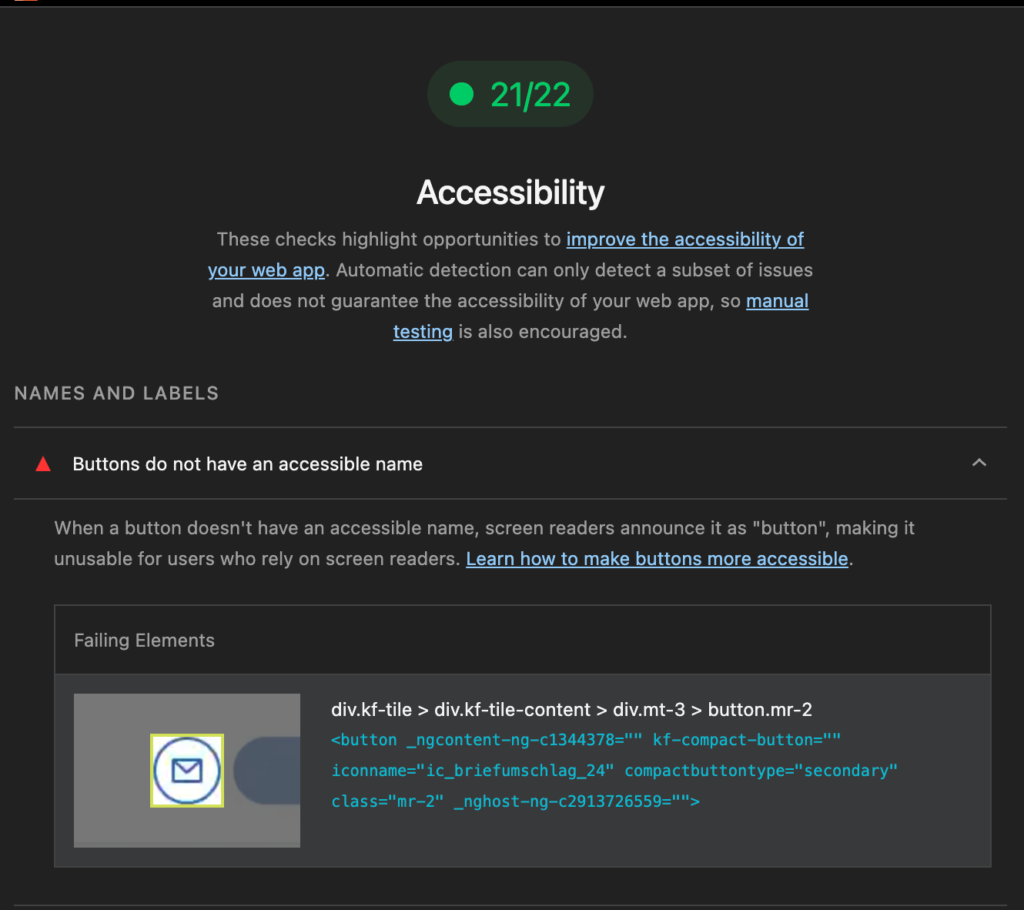
Code snipped before accessibility improvements:
<button mat-icon-button (click)="send()">
 <mat-icon fontIcon="mail"></mat-icon>
</button>
Improvements – Design & development interventions
Input field with visible label
- Design | The new component uses a top-aligned visible label that remains present at all times, across all field states. This ensures users always know what information is required.
- Development | Each input is coded with an ARIA label to support screen readers and assistive technologies.
Minimal contrast ratio (WCAG 2.1 AA)
- Design | A minimum contrast ratio is guaranteed for text and input borders, following WCAG 2.1 AA standards. Clear and distinguishable border colors are defined for all states (default, hover, focused, error, read-only).
- Development | Implementation follows the design system tokens, ensuring contrast compliance is enforced consistently in code.
Descriptive hints
- Design | Descriptive hints are placed below each input field when needed, helping users understand requirements and reducing errors.
- Development | Hints are linked to fields with ARIA described by attributes so they are correctly announced by screen readers.
Error messaging
- Design | Error messages are specific, actionable, and paired with icons, so feedback is not dependent on color alone.
- Development | Errors are programmatically associated with input fields, ensuring they are accessible to screen readers.
Read-only vs disabled states
- Design | For view mode, fields are shown as read-only instead of disabled, making content visibly clear and distinguishable.
- Development | Read-only attributes are used to ensure fields remain perceivable and are properly recognised by assistive technologies, unlike disabled fields which may be skipped by screen readers.
After accessibility improvements
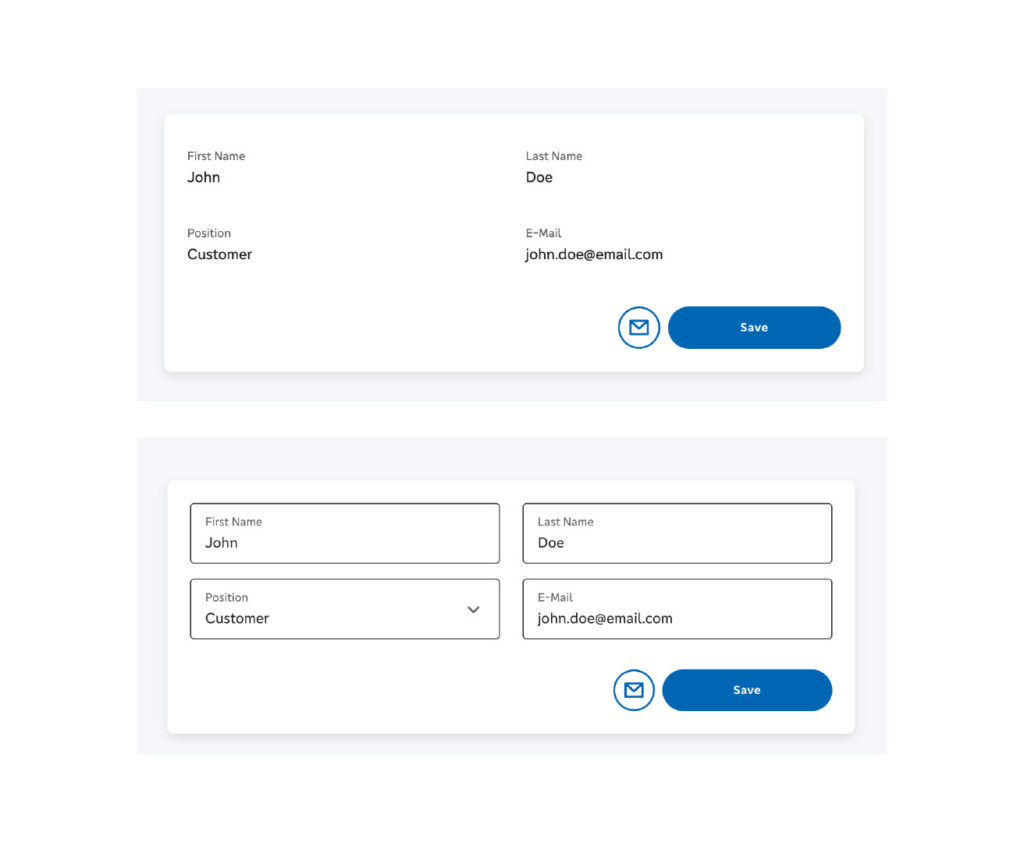
Illustration_03_Form UI after accessibility improvements: edit and view mode
Lighthouse Report
The default look of the form has not changed, but its accessibility is improved which is visible in the report.
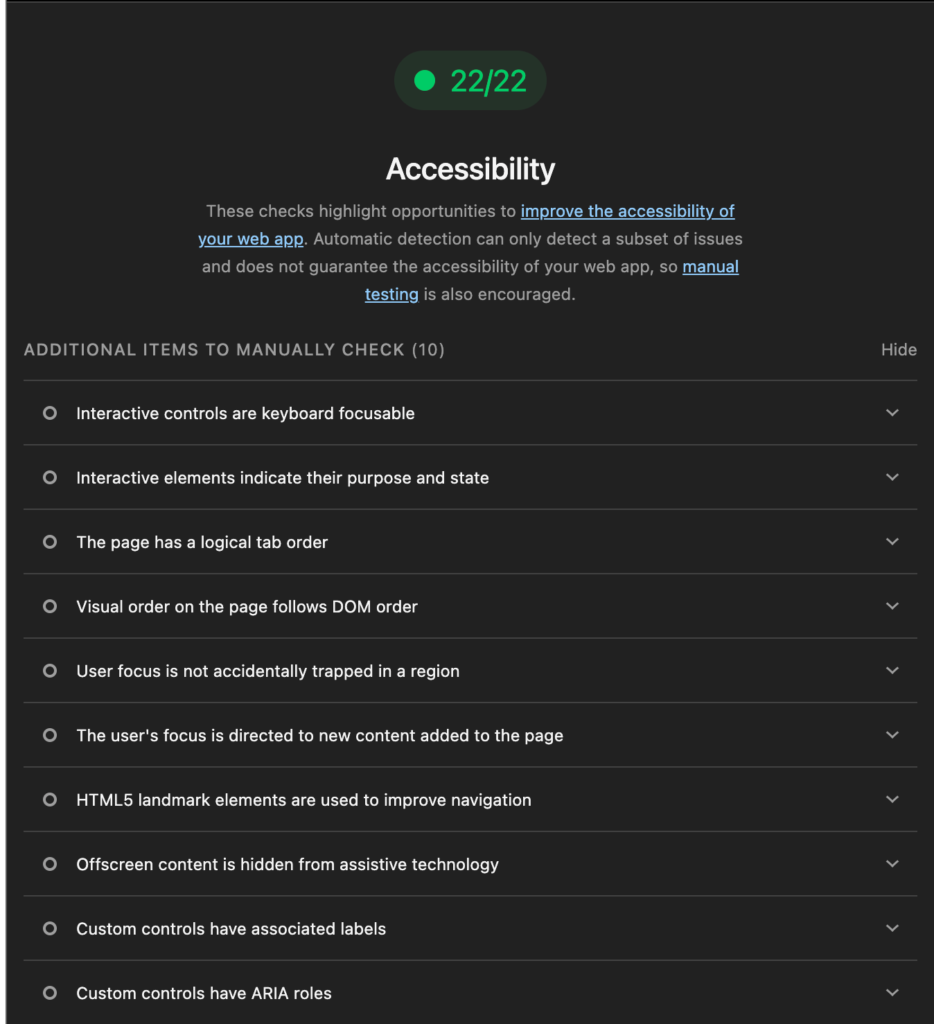
Code snipped after accessibility improvements (e.g., aria-label is added to the icon button)
<button mat-icon-button aria-label="Send email" (click)="send()">
 <mat-icon fontIcon="mail"></mat-icon>
</button>
Key lessons learned from real accessibility implementation
1. Accessibility is a shared responsibility. Every team member must be aware and actively involved in accessibility implementation.
- Managers need to define clear acceptance criteria based on accessibility standards.
- Designers must create solutions with the needs of people with disabilities in mind, understanding different user behaviors and ensuring inclusive product design.
- Developers should strengthen their technical knowledge of embedded accessibility solutions, such as keyboard navigation, screen reader compatibility, and browser/OS support.
- Testers must adopt modern accessibility testing tools, understand accessibility scores, and, whenever possible, include people with disabilities in the testing process.
2. Compliance with regulations is only the foundation. True accessibility requires team empathy for users with disabilities, creativity in design and implementation, and technical proficiency.
3. Accessibility is not a one-time task. It is an ongoing process that requires established workflows at the company level to ensure long-term compliance and continuous improvement.
Tags:Skip tags

Jovana Mitrović
Software EngineerJovana is a software developer with a strong focus on frontend technologies and nearly five years of professional experience. She is passionate about exploring new tools and staying up to date with emerging trends. Combining creative thinking with an analytical approach, she builds intuitive user experiences and fosters smooth, productive collaboration across different roles in the team.

Jovana Romčević
DesignerWith a rich background in diverse design fields, she identifies as an architect and designer, renowned for transforming traditional challenges into modern solutions. Beyond her professional role at ProductDock, she passionately advocates for Bauhaus philosophy through academic activism and engagement with international design communities.
Related posts.

A11y - accessibility, AI
A11y at ProductDock: Innovation through digital accessibility testing
Jovica Zorić• 14. Nov 2025
Find out more
General, Product, UX/UI
From metrics to meaning: GA4 powers smarter strategy
Nataša Dakić• 06. Nov 2025
Find out more
AI, Cloud, Digital solutions, Product
RAG and NLQ in Generative AI: How natural language queries transform data analytics
Saša Mehmedagić• 24. Oct 2025
Find out more