

 DE
DE- AI acceleration
- Industries
- Finance
Nearshore software development for finance—secure, scalable, and compliant solutions for banking, payments, and APIs.
- Retail
Retail software development services—e-commerce, POS, logistics, and AI-driven personalization from nearshore engineering teams.
- Manufacturing
Nearshore manufacturing software development—ERP systems, IoT platforms, and automation tools to optimize industrial operations.
- Finance
- What we do
- Services
- Software modernization services
- Cloud solutions
- AI – Artificial intelligence
- Idea validation & Product development services
- Digital solutions
- Integrations for digital ecosystems
- A11y – Accessibility
- QA – Test development
- Technologies
- Front-end
- Back-end
- DevOps & CI/CD
- Cloud
- Mobile
- Collaboration models
- Collaboration models
Explore collaboration models customized to your specific needs: Complete nearshoring teams, Local heroes from partners with the nearshoring team, or Mixed tech teams with partners.
- Way of work
Through close collaboration with your business, we create customized solutions aligned with your specific requirements, resulting in sustainable outcomes.
- Collaboration models
- Services
- About Us
- Who we are
We are a full-service nearshoring provider for digital software products, uniquely positioned as a high-quality partner with native-speaking local experts, perfectly aligned with your business needs.
- Meet our team
ProductDock’s experienced team proficient in modern technologies and tools, boasts 15 years of successful projects, collaborating with prominent companies.
- Why nearshoring
Elevate your business efficiently with our premium full-service software development services that blend nearshore and local expertise to support you throughout your digital product journey.
- Who we are
- Our work
- Career
- Life at ProductDock
We’re all about fostering teamwork, creativity, and empowerment within our team of over 120 incredibly talented experts in modern technologies.
- Open positions
Do you enjoy working on exciting projects and feel rewarded when those efforts are successful? If so, we’d like you to join our team.
- Hiring guide
How we choose our crew members? We think of you as a member of our crew. We are happy to share our process with you!
- Rookie boot camp internship
Start your IT journey with Rookie boot camp, our paid internship program where students and graduates build skills, gain confidence, and get real-world experience.
- Life at ProductDock
- Newsroom
- News
Stay engaged with our most recent updates and releases, ensuring you are always up-to-date with the latest developments in the dynamic world of ProductDock.
- Events
Expand your expertise through networking with like-minded individuals and engaging in knowledge-sharing sessions at our upcoming events.
- News
- Blog
- Get in touch

28. May 2026 •10 minutes read
8 evening sessions vs 23 workdays: Measuring AI acceleration and the human role behind it
Bruno Raljić
Unit Lead & Integrations Service Lead at ProductDock
AI acceleration is real. It is here, and teams that ignore it are already falling behind. But speed without direction is not acceleration. It is faster mediocrity.
The question is not whether to use AI. The question is what happens when you do. More output per hour does not automatically mean better output. It means more of whatever you were already producing, just faster. If the input is weak, you get weak results at scale.
This is a post about what AI acceleration actually looks like when it works. Not a demo. Not a prototype, but a fully functional native mobile app developed across 8 evening sessions, measured against the time a senior developer would require to deliver the same scope. The numbers behind the claims in this post come from git history. The quality of AI acceleration comes from somewhere else. From the person directing it.
I lead teams for a living. When AI started changing how those teams work, I wanted to feel it firsthand before talking about it.
The app is called WornEnough. It is a personal wardrobe tracker I built for myself. The idea is simple: know what you own, log what you wear, let it remind you of that item you bought but never actually wore, and find out whether the expensive ones are actually worth the price. A jacket is not expensive if you wear it regularly. It is expensive if it sits in the closet, forgotten. The point was a native mobile app, not a website. That is a harder problem, and harder problems tell you more. I wanted to test it against something that is not another to-do list.
This is not a production-released app. You won’t find it on any of the mainstream app stores. It is a personal tool, developed across 8 real evening sessions, with family and life in between. That context matters because those sessions were not focused workdays. Instead, they originate from evening sessions, with the laptop reopened somewhere after 9 p.m., long after the day’s obligations were met.
This was the environment in which this measurement was taken.
The team
The development setup involved two separate AI interfaces: Claude web chat for planning and architectural decisions, and Claude Code CLI for implementation directly in the codebase. Keeping them separate was intentional. Different roles, different contexts, different conversations.
Working across both involved copy-pasting output from one side as input to the other. To make my experience of overseeing the collaboration between the two more natural, I decided to give them names next to the roles they already had, because that is how I think about teams. People with names and positions, not tools.
The Claude web chat became my tech lead. When I asked it to introduce itself, it said Lea. The Claude Code agent running in the terminal became the senior developer. When I asked Lea who she had hired, she “looked at the CV” and came back with Lucas. Both had their place on the team: Lea keeping the bigger picture, and Lucas keeping his head down and shipping.
So, now you know we have two names on the team starting with L. And if you have been anywhere near a tech conference in the past two years, you have probably heard the term LLM thrown around. So, the next team member had to have a name starting with M, right? That slot filled itself later, when I needed a principal engineer for a one-time architecture review. I brought in a more powerful model, and the LLM team was complete.
Lea. Lucas. M.
BTW, for those who have heard LLM but never looked up what it stands for: Large Language Model. Not too relevant for this blog post, but next time you hear it, you will think of us.
The method
How did these 8 sessions look in practice?
I have not written a native mobile app before. It has also been a while since I wrote production code professionally. Some architectural instincts stayed, but the implementation details did not. Asking the agent to explain every file change would have created more cognitive load than value. So I shifted the interface.
Instead of reading code, I read markdown files. Plain, simple text.
Those files became the operating layer between me and the codebase:
- TODO.md: the task board
- STATUS.md: executive summary after each phase, written without technical jargon, structured around three questions: what was built, why it was built that way, and what cannot be skipped before moving forward
- V2.md: good ideas for future consideration
- DESIGN.md: clear guidelines for colors, spacing, and components to ensure the design’s intent is obvious to Lucas.
- and more…
These files served two purposes. For Lucas, they were the context that made each new session coherent without re-explaining the project from scratch. For me, they were the way back in after a day away. Opening STATUS.md before a session was the equivalent of a five-minute standup. I knew where we were, what was decided, and what came next.
After each phase, we returned to the foundation. Not to add features, but to address what had accumulated: tech debt, missing tests, decisions that looked different now that more of the system existed. I would ask Lucas to summarise the phase, identify what did not meet the technical or quality standard, and propose what needed to be resolved before continuing.
The agent kept the files current. I kept the priorities straight. One thing I intentionally skipped: a formal code review of the generated output. For a personal project with no production users, the risk was mine to take. On a client engagement, that step stays, and it will affect the multipliers.
What was delivered
Before we go into the numbers, a quick look at what those 8 sessions actually produced.
The app covers a complete feature loop: a batch photo onboarding wizard that lets you add multiple wardrobe items in one session, a closet grid with filters and status tracking, a daily wear log designed for three taps, an analytics screen with cost-per-wear calculations, configurable thresholds, and a full settings system. It has 50 unit tests, is localized in two languages, and has a design system with 12 color tokens and a consistent visual language throughout.
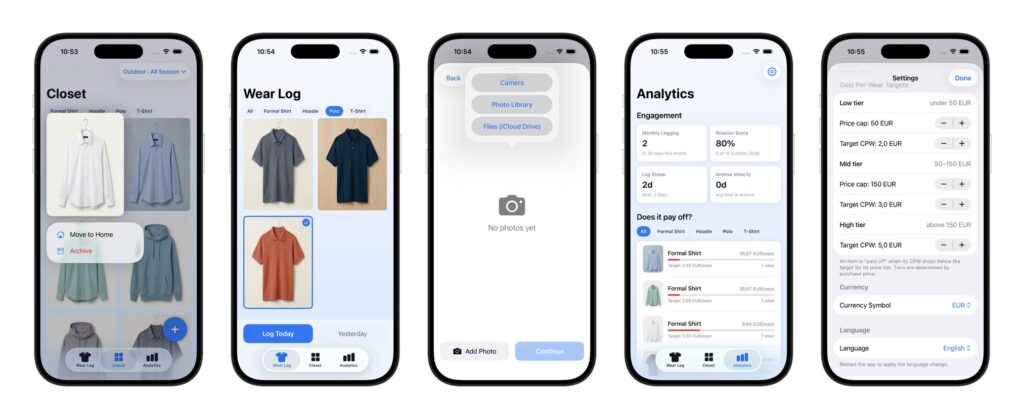
One session was dedicated entirely to architecture review, where a more powerful model/agent audited the codebase as a principal engineer would before a major release. Issues were triaged, critical ones fixed immediately, and the rest moved to a structured backlog.
This is not a simple demo app with a handful of basic features. It is a feature-complete personal tool, with the kind of test coverage and documentation structure you would expect from a professional team delivery.
| Session | Date | Active | What was delivered |
|---|---|---|---|
| S0 | March 6 | 1h | Project setup, CoreData + CloudKit foundation |
| S1 | March 7 | 2h | Full photo wizard, batch tagging, per-item pricing |
| S2 | March 8 | 1h | Closet grid, filters, status transitions |
| S3 | March 9 | 2.5h | Navigation polish, crash fixes, wear log, item detail |
| S4 | March 10 | 0.5h | Documentation overhaul |
| S5 | March 11 | 2.5h | Analytics, forgotten items, Settings, 33 unit tests, full EN/SR language localization |
| S6 | March 12 | 2.5h | Design system, app icon, tech debt, Core Data v2 |
| S7 | March 13 | 3h | Architecture review, KPIs, tech debt batch, UX overhaul, additional unit tests |
| Total: ~15 hours across 8 sessions | |||
The numbers: AI vs senior developer time comparison
Would a senior developer deliver the same scope in 15 hours? Probably not.
To make the comparison meaningful, we did not pull numbers from thin air. Every feature area was mapped against what a senior mobile developer with 5+ years of experience would realistically need, accounting for how a real workday actually breaks down. Not 8 straight hours of coding. Effective keyboard time is, of course, less than that, once you factor in meetings, context switching, documentation reading, and architectural thinking. That is true for any professional environment.
The result: 23 working days. That is our estimate for a senior developer working alone to deliver the same scope, at the same quality level, with the same test coverage and documentation.
For a mid-level developer, our estimate is 38 working days. The difference comes down to familiarity with complex patterns like cloud synchronization, crash-safe data migrations, and platform-specific APIs, where research time adds up quickly. Context switching between unfamiliar areas also costs more at this level, where a senior would draw on experience and move on. The ranges in the table below reflect both profiles: senior on the lower end and mid-level on the higher end.
To map AI time accurately, we ran a git history analysis, extracting commits by session, grouping them by feature area, and matching the output to realistic developer effort estimates. That is how the table below was built.
| Feature area | AI time | Solo developer range | Multiplier range* |
|---|---|---|---|
| Project setup, data model & proper cloud sync setup | 1h | 3-6 days | 5-8x |
| Photo capture & batch onboarding wizard | 1.5h | 5-10 days | 6-9x |
| Closet grid, filters & status management | 1.5h | 4-8 days | 5-7x |
| Wear log & daily tracking | 1h | 3-6 days | 5-8x |
| Analytics, CPW model & KPI dashboard | 2h | 5-10 days | 5-8x |
| Unit tests & localization | 1h | 5-10 days | 9-14x |
| Design system & UI polish | 1h | 3-6 days | 4-6x |
| Tech debt & stability fixes (15+ items) | 1.5h | 4-8 days | 6-10x |
| Total | ~15h | 20-40 days | ~7-9x |
To be clear: this was one person working with AI, not a team. We did not run a parallel benchmark with a human developer. These are our estimates, based on realistic developer output in a professional environment. All figures refer to calendar working days, not hours of active coding. Multipliers reflect this specific project and do not include formal code review, which was intentionally skipped for this low-stakes personal project. In a client engagement, that step stays and brings the multipliers down. Results on other projects may vary depending on scope, complexity, and the experience of the person directing the AI.
What AI can’t do: The human role in AI-augmented development
The numbers above show what was built and how fast. But a spreadsheet cannot tell you what made it worth building.
The first thing AI cannot decide is what to build.
Lucas could implement any feature I described. But he could not tell me which ones mattered. That part was mine. The decision to track cost-per-wear instead of outfit combinations, to design the state flow, to surface forgotten wardrobe pieces passively rather than through push notifications — none of that came from the AI (unlike the em dash in this sentence). It came from knowing my own problem well enough to have an opinion about the solution.
The second thing AI cannot decide is when to stop.
Left to its own devices, Lucas would continue shipping features. The instinct to pause, audit what had accumulated, and address the debt before it compounded. That was always a human call. After each phase, I would deliberately pull back: what is fragile, what is missing, what decision made three sessions ago looks different now that we have more context. That discipline does not come from a model. It comes from having built things before and knowing what happens when you skip it.
The third thing AI cannot decide is when to bring in a fresh perspective.
Midway through the project, before the final polish phase, I paused and brought in a more powerful AI model for a one-time architecture review. Not Lucas. That model assumed the role of a principal engineer, let’s call him M (people nowadays have strange names anyway, eh), with no prior context on the codebase. His job was to audit everything with fresh eyes and tell me what was fragile, what would break first, and what could not go to production as-is.
That call, when to stop trusting the team that built the thing and bring in someone who had never seen it, is a judgment call. Lucas would not have suggested it. He was too close to work.
The human role in this project was not to write code. It was to know what to build, when to stop building it, and whether what was built actually solved the problem it was supposed to solve. That last part only gets answered one way: Do I use the app?
Business case for AI-accelerated nearshoring
What would moving several times faster actually mean for your project?
It means faster delivery. But like in the physical world, more speed means more pressure and consequences.
When output accelerates, the temptation is to keep accelerating. One feature done, immediately request the next. One phase complete, skip the review and move forward. Pace stops being the means and becomes the goal itself. And the people steering that pace, the ones making product decisions, evaluating quality, and catching what the AI missed, feel that pressure the most.
Cognitive overload and cognitive debt are real costs of AI-assisted development that rarely appear in the multiplier calculations. A person can direct an AI team through one complex feature and do it well. Ask them to do three in a row without space to reflect, and the quality of their decisions degrades. The AI keeps executing at the same speed. The human does not.
At ProductDock, we treat acceleration as a tool, not a target. Our teams use AI to move faster on execution while protecting the time and headspace needed for good judgment. Speed is one dimension. Architecture, product thinking, and team dynamics do not disappear because the code writes faster. That means deliberate pauses after complex phases, structured tech debt reviews, and the discipline to ask whether what was just built is actually right before building what comes next.
The result is not just faster delivery. It is a delivery you can stand behind. Work that does not require another team to come in six months later and untangle what was shipped in a hurry.
That is what human in the loop actually means in practice. The AI is a “team member.” It is not the one in control.
The numbers are real. But numbers are not what you end up with.
What you end up with is a product. Something that runs, that someone uses, that solves the problem it was supposed to solve. Getting there requires more than acceleration. It requires the judgment to know what to build, the discipline to stop and check, and the patience to let things settle before moving forward.
Speed is available to everyone now. That part is no longer the differentiator.
Knowing when to slow down is.
At ProductDock, this is how we build. The AI is on the team. The judgment is ours.
If you are looking for a nearshoring partner who takes both seriously, you are in the right place. Reach out.
Tags:Skip tags

Bruno Raljić
Unit Lead & Integrations Service Lead at ProductDockBruno has been in software since 2011, starting as a developer and growing into a role that sits between people, clients, and delivery. At ProductDock, he builds and leads teams, works directly with clients, and focuses on the human side of software projects. He believes that in the age of AI, the people on a project matter more than ever, not less.
Related posts.

AI
Can AI tell you whether a frozen project is actually safe to turn back on?
Bruno Raljić• 22. Oct 2026
Find out more
AI, Digital solutions, Integration
Two systems, one number, and no rule that gets it right
Danijel Dragičević• 08. Oct 2026
Find out more
AI
Can AI recover project knowledge that only ever lived in one person’s head?
Bruno Raljić• 01. Oct 2026
Find out more